
Introduction
Search for live chat software and you’ll find dozens of tools, most of them claiming to be the fastest, the smartest, or the most complete. That kind of marketing makes the decision feel harder than it needs to be, because the honest truth is that most live chat platforms cover the same basic ground. The real differences show up in the details: how conversations get assigned, how well a tool handles a busy afternoon with several agents online at once, whether it plays nicely with the CRM or store platform you already run, and whether the pricing still makes sense once your team doubles in size.
Picking the wrong tool doesn’t usually blow up dramatically. It just quietly costs you in small ways: a conversation that sits unassigned because routing wasn’t configured properly, an agent retyping the same answer for the tenth time because canned responses weren’t set up, a pricing tier that suddenly triples once you add a few more seats, or a chat widget that goes completely silent the moment business hours end. None of that is obvious during a five minute sales demo, which is exactly why it’s worth knowing what to check before you commit.
This guide walks through what actually matters when evaluating live chat software: the core functionality, how AI and automation fit in, the integrations and security considerations that often get skipped over, realistic pricing expectations, and the mistakes that tend to surface only after a business has already signed a contract.
What Live Chat Software Actually Needs to Do
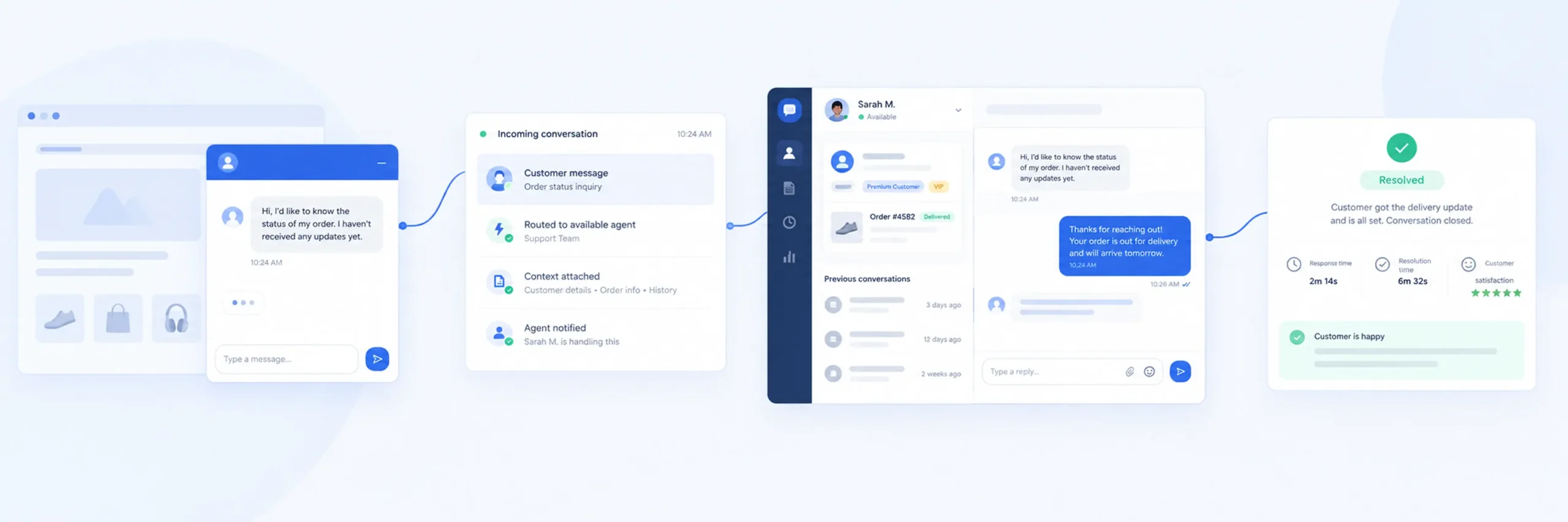
Before comparing specific tools, it helps to separate what live chat software is fundamentally for from the extra features vendors use to differentiate themselves in a crowded market.
At its core, the job is simple: get a customer’s message to the right person quickly, give that person enough context to answer well, and make it easy to track whether the conversation actually got resolved. Everything else, however impressive it looks in a product demo, exists to support that core job, not replace it.
A few categories of functionality consistently matter more than the rest:
- Routing and assignment. When a message comes in, does it land with a specific available agent, or does it sit in a shared queue that everyone assumes someone else is handling? Tools like YS Desk address this with dedicated unassigned conversation views and clear assignment history, so a conversation never quietly falls through the cracks between team members.
- Canned responses. Support teams answer the same handful of questions constantly: shipping times, refund policies, account setup steps. Software that makes it fast to insert a pre-written answer, ideally through a quick keyboard shortcut rather than digging through a menu, saves real time across hundreds of conversations a month.
- Internal collaboration. Agents sometimes need to loop in a colleague or leave a note for whoever picks up a conversation next without the customer seeing it. Internal notes and mention features that let one agent tag another matter more once a team grows past one or two people.
- Reporting that’s actually useful. Response time, resolution time, and customer satisfaction scores tell you whether the team is actually performing well, not just staying busy. A tool that buries this data behind a complicated reports section, or doesn’t track it at all, makes it hard to improve anything with confidence.
- Reasonable customization. The chat widget represents your brand on your website, so being able to adjust its color, position, and greeting message without hiring a developer matters more than it might seem at first glance.
- Proactive engagement. Beyond just waiting for a customer to type first, many businesses use live chat to proactively invite a visitor into a conversation, for example after they’ve spent several minutes on a pricing page without moving forward. This turns live chat into a sales tool as much as a support one, which matters if part of your goal is recovering hesitant visitors rather than only answering inbound questions.
Live Chat, AI Chatbots, or an All-in-One Helpdesk?
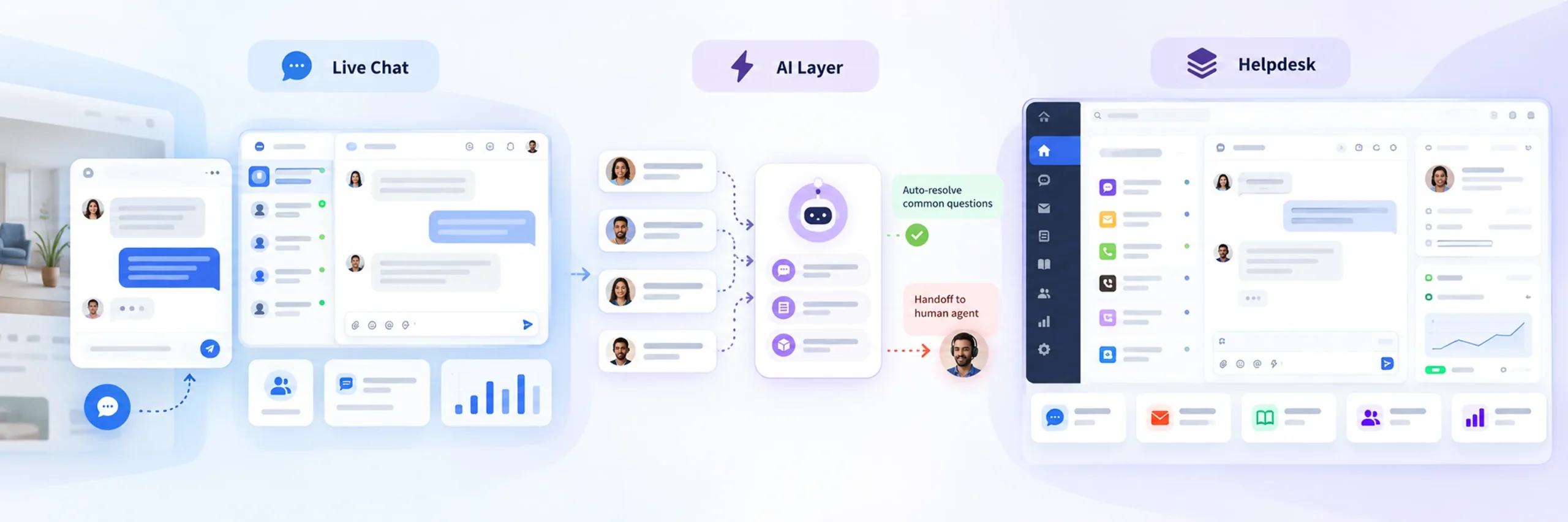
Quick answer: A dedicated live chat tool focuses specifically on real time messaging and is usually the simplest and most affordable starting point. An AI chatbot layer adds automated first responses on top of that. An all-in-one helpdesk or CRM-bundled option folds chat into a much larger platform, which makes sense mainly if you already need the rest of that platform anyway.
This distinction trips up a lot of buyers, because these categories often get compared side by side as if they’re interchangeable, when they’re really solving somewhat different problems.
A dedicated live chat platform is built specifically around messaging: the widget, routing, canned responses, and reporting are the entire product. This tends to be the most straightforward option for a business that mainly wants a reliable way to chat with website visitors without adopting a whole new CRM or support ecosystem in the process.
An AI chatbot adds an automated layer in front of that, answering common questions instantly before a human agent ever gets involved, and in more advanced setups, training itself on your website content, help documentation, or uploaded files to answer more specifically. This can meaningfully cut down repetitive questions reaching your team, but it works best layered on top of solid live chat fundamentals, not as a replacement for human availability entirely.
An all-in-one helpdesk or CRM-bundled option, the kind offered by larger platforms that combine chat with email ticketing, a knowledge base, and broader customer relationship tools, makes the most sense for a business that’s already committed to that ecosystem for other reasons. Buying into the full suite just to get live chat, when you don’t need the rest of it, often means paying for a lot of functionality that goes unused.
Must-Have Features vs Nice-to-Have Features

Not every feature deserves equal weight when comparing tools, and it’s easy to get distracted by an impressive sounding capability that your team will genuinely never use.
- Generally must-have: Reliable message delivery, conversation assignment, canned responses, basic analytics, a widget that works properly on both desktop and mobile, and a sensible offline fallback for when no agent is available. A tool missing any of these basics is going to cause daily friction regardless of what else it offers.
- Often nice-to-have, depending on your business: AI-assisted replies and chatbot automation, multi-level permission systems, visitor session recording, gamified rewards for support agents, and deep customization of the chat widget’s animations and visual effects. These can genuinely help a larger team, but a small business evaluating tools shouldn’t let a flashy nice-to-have distract from checking whether the fundamentals are solid.
The honest exercise here is picturing an actual Tuesday afternoon at your business: three customers messaging at once, one agent handling all of them, a question that needs a colleague’s input. Whichever tool handles that ordinary scenario smoothly, without extra clicks or confusion, usually matters more than a feature you’ll open once and forget about.
AI and Automation Capabilities Worth Evaluating

AI has become a standard talking point in live chat marketing, but the actual usefulness varies a lot depending on how it’s implemented, so it’s worth looking past the label and checking specifics:
- Automated first responses. Can the tool answer common, repetitive questions instantly, freeing agents to focus on more complex conversations, without making the automation obvious or frustrating when a customer clearly needs a human?
- Trainable knowledge sources. More capable AI features let you train responses on your own website content, help documentation, or uploaded files, rather than relying on generic, one-size-fits-all replies that don’t reflect your actual policies or products.
- Smart routing suggestions. Some platforms use automation to suggest which agent is best suited for a specific conversation, based on past performance or specialty, rather than relying purely on simple round-robin assignment.
- A clear handoff to a human. Whatever automation a tool offers, it should make it obvious and easy for a customer to reach a real person when the automated response isn’t cutting it. Automation that traps a frustrated customer in a loop does more damage to trust than not having AI at all.
None of this means AI capability should be a top priority for every business. A small team handling a modest volume of conversations may get more value from solid fundamentals than from an AI feature that’s more marketing talking point than daily necessity. It matters more as conversation volume grows to a point where repetitive questions are genuinely eating into agent time.
Integrations That Actually Matter

Live chat software rarely operates in isolation. It usually needs to fit into a business’s existing stack, and integration gaps tend to surface only after you’ve already committed to a tool.
- CRM integration. If your business already tracks customer relationships in a CRM, a live chat tool that can sync conversation history and contact details there avoids duplicate record keeping and gives agents fuller context during a conversation.
- Ecommerce platform compatibility. For a store, being able to see a visitor’s cart contents or recent order history directly inside the chat conversation lets an agent answer more specifically, rather than asking the customer to repeat information the store already has.
- Email and notification tools. A live chat platform that connects to your existing email system for offline message notifications keeps your team from needing to check a separate dashboard constantly just to know something needs attention.
- WordPress and CMS compatibility. If your site runs on WordPress specifically, confirm the chat widget installs cleanly through a plugin or embed code without conflicting with page builders, caching plugins, or other common WordPress tools, since compatibility issues here are a common source of frustration.
- Analytics tools. Being able to see chat engagement alongside your existing web analytics helps connect chat activity to actual business outcomes, rather than treating chat performance as a completely separate, siloed metric.
Security, Data Ownership, and Compliance
Live chat handles customer conversations, and sometimes sensitive account or payment related details, which makes security considerations worth taking seriously rather than treating as an afterthought:
- Cloud-hosted versus self-hosted. Most live chat platforms run entirely on the vendor’s servers, which is simpler to set up but means your conversation data lives on infrastructure you don’t directly control. A self-hosted or more data-controlled option keeps that information within your own environment, which can matter more for businesses in regulated industries or with strict internal data policies.
- Permission and access controls. As a team grows, being able to control exactly what each role can see and do—whether a junior agent can view billing details, for example—becomes more important than it seems when you’re just a two-person team sharing one login.
- Data handling and compliance. If your business operates in regions with specific data protection requirements, confirm how the platform handles data retention, deletion requests, and where customer data is actually stored, rather than assuming compliance without checking.
- Session security. For the chat widget itself, confirm that visitor sessions are handled securely, particularly if your site collects any personal information through chat before an account or login exists.
How Much Does Live Chat Software Typically Cost?
Quick answer: Pricing for live chat software varies widely by platform and feature depth, but many mid-market tools commonly fall somewhere in the range of fifteen to twenty dollars per agent per month at entry level paid tiers, with free plans often available for very small teams and enterprise pricing scaling well beyond that based on features and volume.
Most live chat software uses one of three pricing structures:
- Per-seat pricing: Charges based on how many agents have login access, which tends to work well for a team where headcount grows slowly and predictably.
- Per-conversation pricing: Charges based on volume instead, which can suit a business with seasonal spikes but occasionally leads to surprise costs during an unexpectedly busy month if there isn’t a clear cap.
- Tiered seat-and-volume structure: Bundles a seat limit and a conversation limit together at each tier, with more advanced features like team performance analytics or data exports unlocked only at higher tiers, similar to how platforms like YS Desk structure their Free, Starter, Growth, and Enterprise plans.
Whatever the pricing model, it’s worth mentally testing it against your business a year from now, not just today. A tool that’s affordable at your current size but scales awkwardly once you add a fourth or fifth agent can end up costing more in the long run than a slightly pricier option with more sensible growth pricing from the start. It’s also worth calculating a rough return on investment before committing: if live chat helps recover even a small percentage of visitors who would have otherwise left without buying or reaching out, that value often outweighs the monthly cost fairly quickly for a business with meaningful website traffic.
How to Actually Test Software Before You Buy

Quick answer: Use the platform’s free trial with real or realistic conversations, involving the actual team members who’ll use it daily, rather than judging the tool based on a guided sales demo alone.
A polished demo is designed to show a tool at its best under ideal conditions. It rarely reveals how the software behaves when three customers message at once, when an agent needs to hand off a conversation mid-discussion, or when someone tries to find a specific message from two weeks ago. A genuine trial period, run by the people who’ll actually be using the tool day to day, surfaces friction a sales walkthrough won’t.
Key checkpoints worth specifically evaluating during a trial:
- How quickly a new conversation actually reaches an agent’s screen.
- Whether canned responses are fast to insert or buried deep in menus.
- How search and conversation history perform once there’s a realistic volume of past chats.
- Whether the mobile experience is genuinely usable rather than a cramped afterthought.
Questions to Ask Before You Commit
A handful of direct questions, asked before signing up rather than after, tend to surface problems a feature comparison chart won’t show:
- How does an unassigned conversation get handled? If a customer messages and no agent is actively online, does the software make that obvious to whoever logs in next, or can a message realistically sit unanswered without anyone noticing?
- What happens outside business hours? Does the tool support an offline message flow that captures the question for follow-up, or does the chat widget just go silent with no fallback at all?
- How easy is it to actually find a past conversation? A tool that only lets you scroll through history rather than searching by keyword, date, or customer becomes a real problem the moment your conversation volume grows past a few dozen a week.
- Can you see how the team is actually performing? Response time, resolution rate, and customer satisfaction scores should be visible without needing to export raw data and calculate them manually.
- What does the pricing look like at double your current size? Look specifically at what happens when you add a few more agents or your conversation volume grows, not just the price of the plan you’d start on.
- Does it integrate with what you already use? Confirm CRM, ecommerce, and notification integrations actually exist and work as described, rather than assuming compatibility based on a general claim of “integrates with everything.”
Matching Software to Your Team’s Size
- A solo founder or very small team usually needs a straightforward setup more than a deep feature set: a clean chat widget, basic canned responses, and simple email fallback for messages that arrive when no one’s available. Overpaying for advanced routing rules and multi-agent collaboration tools at this stage rarely pays off yet.
- A growing team with dedicated support agents benefits from real assignment and routing logic, internal notes for handing off conversations, and at least basic reporting to see how response times are trending as volume increases. This is usually the stage where the gap between a barebones tool and a properly built one starts to matter, and where CRM or ecommerce integrations start paying off as conversation volume grows.
- A larger, established support operation needs deeper reporting, permission controls, and plan tiers that support multiple teams, shift patterns, and more rigorous performance tracking, along with AI-assisted deflection for repetitive questions and integrations into whatever CRM or helpdesk systems the rest of the business already relies on.
Matching the tool to your current stage, rather than buying for a scale you haven’t reached yet, tends to be the more sensible approach. Most decent platforms, YS Desk included, are built with tiered plans specifically so a business can start small and move up as its actual support volume grows, rather than committing to enterprise level pricing before there’s enterprise level need.
Mistakes That Lead to Choosing the Wrong Tool
A handful of recurring mistakes account for most cases of a business regretting its live chat software choice a few months in:
- Choosing based on the demo alone. A guided product demo is designed to show a tool at its best. Actually testing it with real, messy support scenarios reveals more than a polished sales walkthrough ever will.
- Ignoring what happens after hours. A chat widget that simply disappears or goes unanswered outside business hours can create a worse impression than not having live chat at all, since customers can see it’s there and available, only to get no response.
- Underestimating how pricing scales. A plan that looks affordable today can become unexpectedly expensive once a business adds a few more agents or crosses a conversation volume threshold that bumps it into a higher tier.
- Overlooking integration gaps until after signing up. Assuming a tool “integrates with everything” without actually confirming the specific connections your business needs often surfaces as a frustrating limitation only after the contract is already signed.
- Skipping the team’s actual input. The people using the tool daily will notice friction that a decision maker evaluating from the outside might miss entirely. A quick trial period with the actual support team using it tends to surface real problems faster than any spec sheet comparison.
- Overvaluing features the business won’t use yet. A small team doesn’t need enterprise-grade permission structures, multi-department routing, or advanced AI training pipelines on day one. Paying for that complexity early usually just adds an unnecessary learning curve.
Frequently Asked Questions
Reliable conversation routing and assignment, canned responses for common questions, basic performance analytics, integrations with tools you already use, and a chat widget that works well on both desktop and mobile matter more early on than advanced automation or deep customization options.
Not necessarily. Price often reflects the depth of advanced features like multi-level permissions, AI automation, or detailed analytics, which matter more for larger teams. A small business can often get everything it actually needs from a lower tier or more affordably priced tool.
It depends on what else your business needs. A dedicated live chat tool is usually simpler and more affordable if messaging is your main requirement. An all-in-one helpdesk or CRM-bundled platform makes more sense if you already need the broader ticketing, knowledge base, or CRM functionality that comes with it.
Pricing varies widely, but many mid-market tools charge somewhere in the range of fifteen to twenty dollars per agent per month at entry level paid tiers, with free plans commonly available for very small teams and enterprise pricing scaling based on features and volume.
Not necessarily right away. AI-driven automated responses tend to matter more once conversation volume is high enough that repetitive questions are genuinely consuming agent time. A smaller team may get more value from solid fundamentals than from AI features used only occasionally.
Check the pricing tiers and feature gates at higher plan levels before committing, not just the plan you’d start on. A platform like YS Desk, for example, lays out what unlocks at each tier—team performance analytics, live monitoring, data exports—so you can see in advance what a future upgrade would actually include.
Cloud-hosted options are generally simpler to set up and maintain, which suits most small and mid-sized businesses. A self-hosted or more data-controlled option matters more for businesses in regulated industries or with strict internal requirements around where customer data is stored.
Choosing based on an impressive demo without testing how the tool handles a realistically busy, multi-agent scenario, and not checking closely enough how the pricing and integrations hold up as the team or conversation volume grows.
Final Thoughts
Choosing live chat software isn’t really about finding the tool with the most features. It’s about finding the one that fits how your team actually works right now, with enough room to grow without needing to switch platforms again in a year. Routing that actually gets conversations to the right person, canned responses that save real time, integrations that avoid duplicate work, security that matches your business’s requirements, and pricing that scales sensibly matter far more than any single flashy feature a vendor leads with in their marketing.
Whatever shortlist you build, it’s worth testing candidates against a real, busy scenario rather than just a guided demo, and checking integration and pricing details before signing anything. A tool like YS Desk, structured around tiered plans that add capability as a team grows, reflects the kind of setup worth looking for generally: enough functionality to run a support operation properly from day one, with a clear path to more advanced features once your business actually needs them.