
I still remember the shared-inbox days. One email address, three people with the login, and a running mystery every Monday morning: who replied to that customer from Thursday? Did anyone? A customer would email again, annoyed, and someone would scramble to find the original thread buried under forty other unread messages. Nobody was doing anything wrong, exactly — there just wasn’t a system. There was just a mailbox and good intentions.
That’s the situation most businesses are in right before they go looking for help desk software.
When a business only has a handful of customers, answering questions over email, phone, live chat, WhatsApp, or social media is genuinely fine. You just reply. Nobody needs a system for three conversations a week.
But scale that up to 20, 50, or 100 conversations a day, and the cracks show up fast. A customer’s still waiting on a reply. Another conversation actually got resolved — nobody bothered to mark it. One agent has no idea a teammate is already talking to the same customer about the same issue. Messages get buried. And the person managing the team? They have almost no real visibility into how fast, or how well, anyone’s actually responding.
This is exactly the gap help desk software is built to close.
At its core, it gives a business one centralized place to manage customer conversations — assigning them, replying to them, collaborating internally, collecting feedback, and actually measuring how support is performing. And the market has taken notice: help desk software is now a multi-billion-dollar global category, growing at double-digit rates year over year, as more companies move off shared inboxes and homegrown spreadsheets. Separately, research from the U.S. Bureau of Labor Statistics has pointed to poor customer service costing companies tens of billions of dollars annually — which is part of why this stopped being a “nice to have” a while ago.
So what does help desk software actually do? How does it work day to day? What features are worth caring about? And how do you know it’s time to move on from a shared inbox to something built for this?
Let’s get into it.
What Is Help Desk Software?
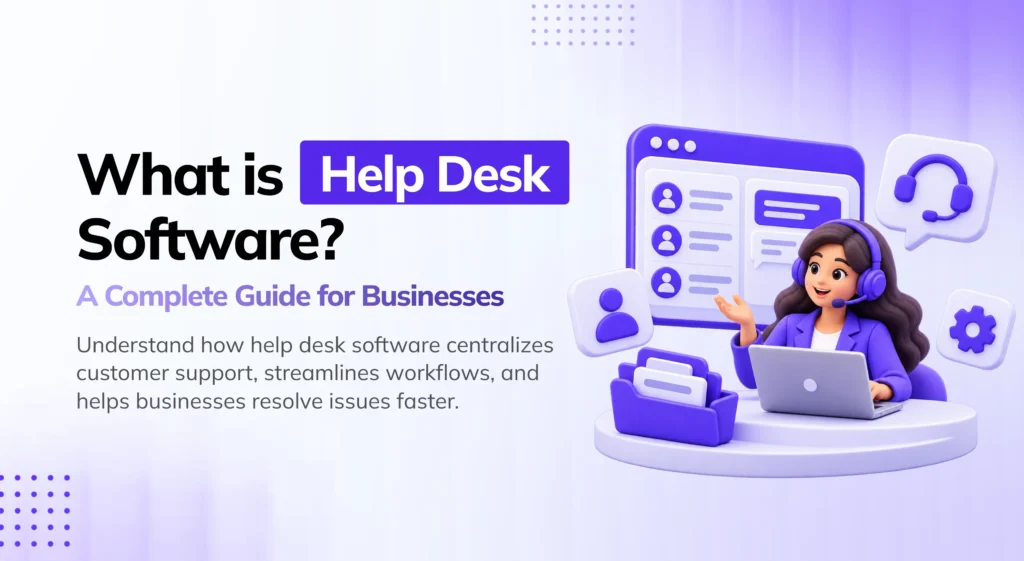
Help desk software is a platform that helps a business organize and manage customer support requests from one centralized workspace.
Instead of customer questions living across separate email threads, chat apps, spreadsheets, and internal messages, everything support-related gets pulled into a single system.
Depending on the platform, that typically means a team can:
- Receive customer conversations
- Keep open and resolved conversations sorted
- Assign conversations to specific agents
- Track what’s unread and what’s still pending
- Search past conversations
- Talk to customers in real time
- Add internal notes for teammates
- Use canned (pre-written) responses
- Share files and media
- Collect customer satisfaction feedback
- Monitor website visitors
- Track how quickly the team is responding
- Analyze support performance over time
- Manage team members and permissions
- Export support reports
The goal here isn’t to hand your team “yet another place” to reply to people. The real goal is a support workflow that actually holds together under volume — one where nothing depends on someone’s memory.
Why Do Businesses Need Help Desk Software?
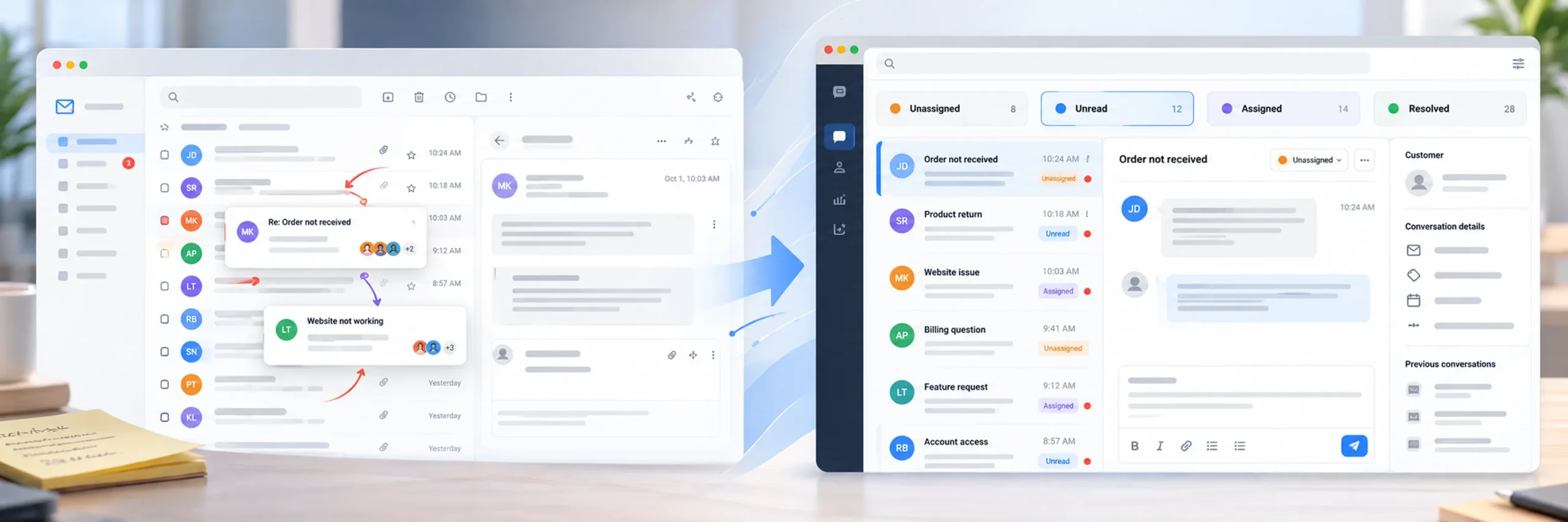
Most businesses start support with a shared inbox — something like support@company.com.
And honestly? That works. For a while.
But imagine the moment you’re fielding 50 or 100 conversations a day. Your team now has to figure out, by hand, which messages are new, which customers are still waiting, who’s supposed to own what, what’s actually been resolved, and what needs attention right now. Multiple people digging through the same inbox, not always sure who’s already handled what.
Do that manually for long enough, and it becomes a recipe for missed messages — and, eventually, frustrated former customers.
A proper help desk lets you organize conversations by status, assignment, channel, date, or read state — whatever filter actually helps your team move faster. For example, a support team might set up separate views like:
- All conversations
- Unassigned conversations
- “Assigned to me”
- Unread conversations
- Resolved conversations
- Conversations from a specific channel
- Conversations within a date range
YS Desk builds in exactly this kind of structure — assignment, an unassigned queue, resolved states, search, filtering, sorting, read/unread tracking, and full conversation history.
The result is simple: agents can see, at a glance, what actually needs their attention — instead of guessing or relying on tribal knowledge.
How Does Help Desk Software Work?
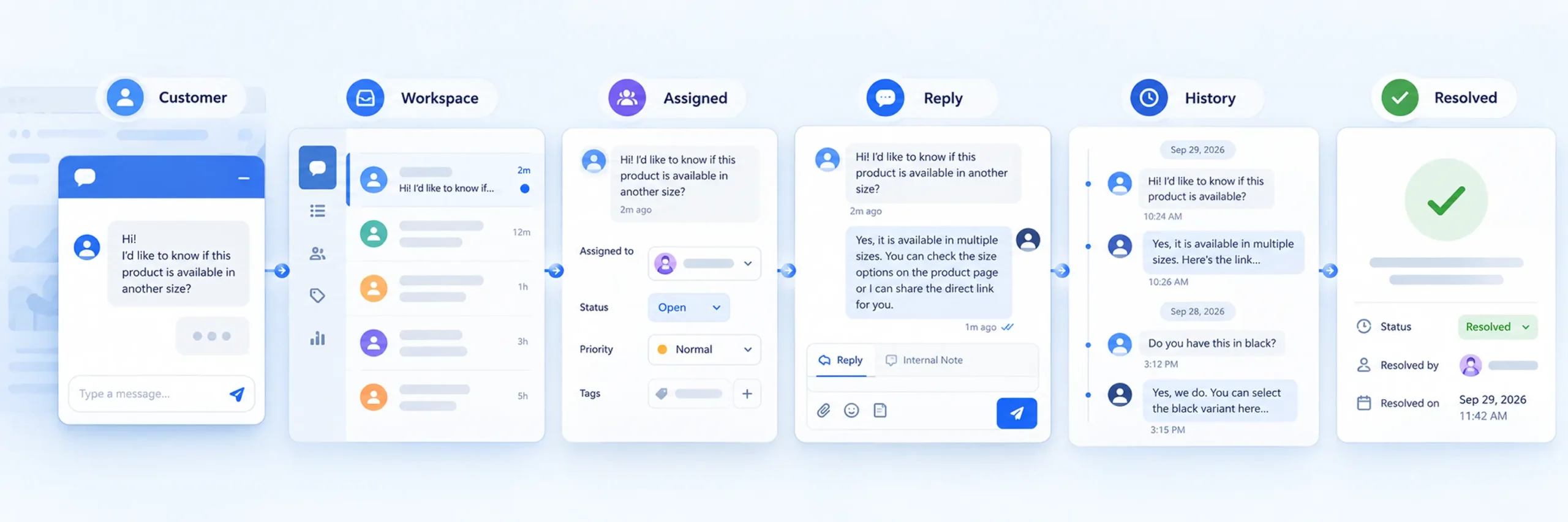
Every platform looks a little different on the surface, but the underlying workflow is fairly consistent across the board.
1. A customer starts a conversation
The customer reaches out through whatever channel’s available to them. For a website-based support system, that’s often a chat widget sitting in the corner of the page — the customer might ask a question, report a problem, or follow up on something from before.
2. The conversation enters the support workspace
Rather than relying on one employee to remember which customers contacted them, the conversation gets stored inside the system itself. Agents can then see, immediately, what’s open, unread, assigned, or still unresolved.
3. The conversation gets assigned
If more than one person handles support, the conversation can be routed to the right agent — creating actual ownership. A technical question might go to a technical support agent, while a pricing question lands with sales or customer success instead.
YS Desk supports both assignment and unassignment, along with a full assignment history, so it’s always clear who owned a conversation and when.
4. The agent responds
The assigned agent replies right from the support interface. Modern help desk platforms go well beyond plain text at this point — YS Desk, for instance, supports rich text messages, threaded replies, internal notes, file attachments, media previews, audio messages, emojis, and message search.
5. The conversation sticks around as history
A conversation shouldn’t disappear the moment it’s answered. Keeping history around gives agents real context — which matters when:
- A customer contacts the company again later
- A conversation needs to be handed off to someone else
- A manager needs to review how something was handled
- An agent needs to double-check what was said previously
- A customer references something discussed earlier
6. The conversation gets resolved
Once the issue’s actually addressed, the conversation gets closed or marked resolved — keeping active requests cleanly separated from completed ones.
Important Features to Look for in Help Desk Software

Not every help desk platform is built the same way. Before choosing one, it’s worth being deliberate about which features actually match how your team works.
Conversation Management
This is the foundation everything else sits on top of. Look for:
- Open and resolved conversation states
- Unassigned conversations
- Agent assignment
- Conversation search
- Status filtering
- Date filtering
- Channel filtering
- Read and unread states
- Conversation sorting
- Full conversation history
A good conversation-management setup should let agents answer one question instantly: “What needs my attention right now?”
Real-Time Messaging
For businesses running website support, real-time communication genuinely changes the customer experience.
YS Desk runs on WebSocket-based technology, powering live message delivery, conversation updates, presence information, and unread-count syncing — so the team is working with what’s actually happening, not refreshing the page and hoping.
Internal Notes and Team Collaboration
Not every message should go to the customer. Sometimes agents need to talk something through internally first. Something like: “This customer’s reporting a billing issue — can someone from payments take a look?”
An internal note lets the team have that conversation without it leaking through to the customer.
Solid team collaboration usually also includes:
- @mentions
- Assignment
- Notifications
- Internal notes
- Assignment history
- Team activity
- Permission controls
YS Desk covers this with agent mentions, mention notifications, read/unread states on mentions, and a dedicated view just for mentions.
Canned Responses
Support teams end up answering the same handful of questions constantly. Rather than retyping the same reply every time, agents can lean on canned responses — saved, reusable replies for things like:
- Business hours
- Refund requests
- Shipping questions
- Account information
- Basic troubleshooting
- Product availability
- Common setup questions
YS Desk supports reusable canned responses with shortcuts, categories, search, editing, and visibility controls.
Worth saying plainly: canned responses work best as a starting point an agent personalizes — not a script copy-pasted regardless of what the customer actually said.
Customer Satisfaction (CSAT)

Support isn’t only about how many conversations get closed. It’s also about whether customers actually walked away satisfied.
That’s typically measured through CSAT — Customer Satisfaction Score — where customers rate their support experience directly, often right after a conversation wraps up.
YS Desk supports 1–5 star CSAT ratings, optional comments, agent-triggered surveys, public rating pages, feedback screens, and guest CSAT history — giving businesses a second lens on the customer experience beyond raw conversation counts.
Support Analytics
Customer support quietly generates a lot of useful operational data, if someone’s actually looking at it.
Worth asking:
- How many conversations are we receiving?
- How many visitors are reaching out to support?
- How many chats are we missing?
- How fast are agents responding?
- Is support volume trending up or down?
- Which agents are handling what?
- How satisfied are customers, really?
YS Desk’s analytics cover total conversations, active chats, visitors, missed chats, engagement rate, average first-response time, daily trends, agent performance, customer insights, live monitoring, and reports — the kind of data that helps a manager spot a bottleneck instead of just sensing that something feels slow.
Website Live Chat
Plenty of businesses want customers to be able to reach out without ever leaving the website. A chat widget makes that possible — a floating launcher sits on the page, and clicking it opens a conversation directly.
YS Desk provides an embeddable JavaScript-based chat widget with configurable branding, launcher settings, callbacks, lazy loading, file uploads, email collection, dark mode, and session persistence.
This tends to matter most for SaaS companies, ecommerce stores, agencies, and online businesses fielding sales inquiries.
Website Visitor Monitoring
Some help desk platforms also let you see visitors who haven’t reached out yet. YS Desk includes visitor monitoring — live visitor lists and activity tracking — giving support and sales teams extra context on what’s happening on the site in real time.
Help Desk Software vs. Shared Email
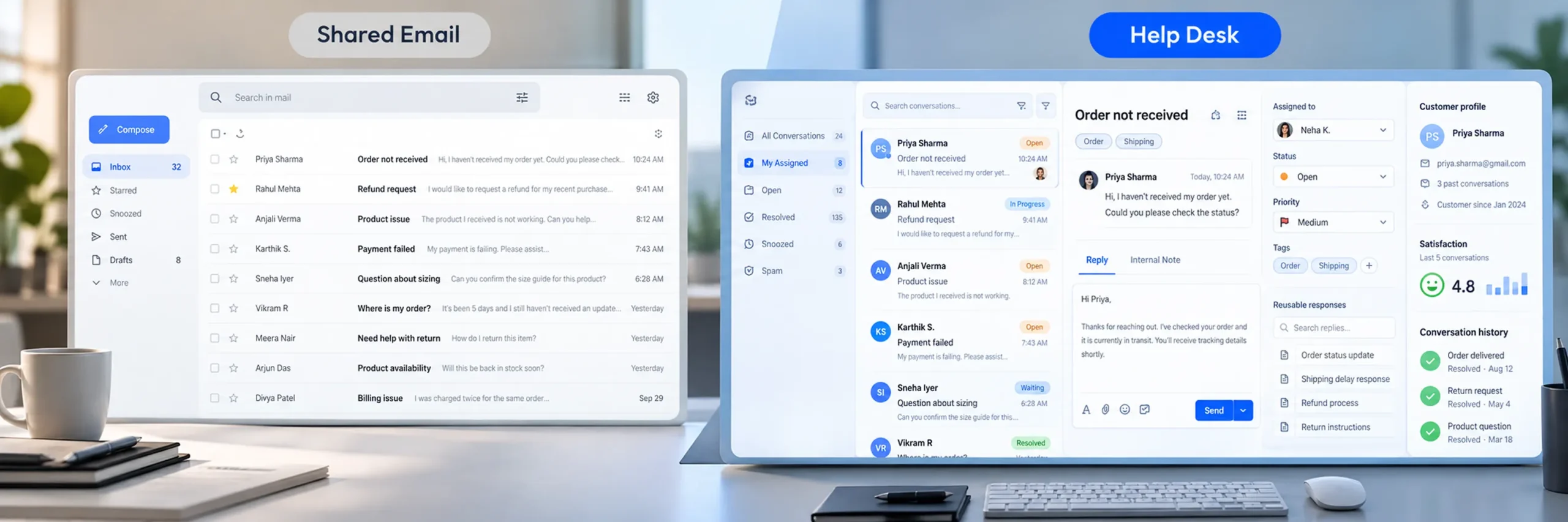
A shared inbox genuinely works for a small team. But as volume grows, the gaps start showing.
| Capability | Shared Email Inbox | Help Desk Software |
|---|---|---|
| Customer communication | Yes | Yes |
| Conversation history | Yes | Yes |
| Conversation assignment | Limited | Yes |
| Open/resolved status | Limited | Yes |
| Internal notes | Limited | Yes |
| Canned responses | Basic | Available |
| Team permissions | Basic | More advanced |
| Customer satisfaction (CSAT) | Usually separate | Built in |
| Support analytics | Limited | Available |
| Live visitor monitoring | No | Available on some platforms |
| Advanced conversation search | Limited | Available |
| Team collaboration | Basic | Built into most platforms |
None of this means every business needs a help desk on day one. If you’re handling a handful of questions and one person owns all of it, email might genuinely be enough. The need tends to make itself obvious on its own, once support volume and team size start climbing.
When Should a Business Start Using Help Desk Software?
There’s no magic customer count where a help desk suddenly becomes mandatory. Instead, pay attention to the actual problems your team is running into.
It’s probably worth considering a dedicated help desk when:
- Customer questions keep piling up
- More than one person is handling support
- Conversations are slipping through the cracks
- Customers are waiting too long for a reply
- Nobody’s sure who actually owns a given conversation
- Agents are unknowingly duplicating each other’s work
- Old conversations are hard to dig back up
- Managers have no real way to measure support performance
- Customer feedback isn’t being collected at all
- You want live chat on your website
- You need to actually measure support activity
How to Choose the Right Help Desk Software

Start with what your support workflow actually needs — not with whichever platform has the longest feature list.
Consider your team size
How many people will actually use this day to day? A one-person support operation can get by with something simple. A larger team needs roles, permissions, assignment, and real collaboration tools.
Consider conversation volume
Look at how many conversations you’re handling now, and where that number is realistically headed. Some platforms cap monthly conversations, so it’s worth understanding exactly how those limits work before committing.
Consider collaboration
If multiple agents will be working together, check whether the platform actually supports agent assignments, internal notes, mentions, notifications, roles, and activity tracking.
Consider reporting
If support performance matters to your business — and it should — make sure the platform can give you real numbers, not vibes. At minimum, you’ll want visibility into conversation volume, response time, customer satisfaction, missed conversations, and agent performance.
Consider the customer’s side of things
Don’t evaluate the agent dashboard alone. Look at what the customer actually experiences: chat widget design, mobile usability, message delivery speed, file sharing, email collection, and offline messaging. A support system should make communication easier for both sides — not just your team’s.
How Much Does Help Desk Software Cost?
Pricing varies quite a bit depending on the platform and what’s actually included. Common factors that drive the price include the number of agents, conversation volume, analytics, CSAT feedback tools, reporting, and monthly vs. annual billing.
YS Desk, for example, offers four plans: Free, Starter, Growth, and Enterprise. The plans range from a free tier up to paid tiers with more agent seats and higher conversation limits. The Starter and Growth plans add capabilities like CSAT, transcript email delivery, role assignment, chat customization, response-time analytics, team performance analytics, live monitoring, customer insights, activity logs, and CSV reporting, depending on the tier.
Help Desk Software for Small Businesses & SaaS Companies
There’s a common assumption that help desk software is only for large customer support departments. That’s not really true. A small business can genuinely benefit once conversations start getting hard to track. For growing SaaS companies where the founder handles support alone at first, that responsibility gradually spreads across developers, customer success, and support agents. A centralized system gives that growth actual structure, rather than chaos.
Final Thoughts
Help desk software is more than a shared inbox wearing a different interface. It gives a business a structured way to manage customer conversations from the moment a customer reaches out to the moment their issue’s actually resolved. For a growing business, that structure tends to matter more with every passing month, not less.
For businesses moving beyond scattered support channels and looking for one centralized way to manage customer communication, getting started with YS Desk can provide exactly the structure needed to build a more organized — and measurable — support operation.